Blog Posts

Starting from Scratch: The Newbie’s Guide to top 5 Social Media Networks

By Daisy Quaker

Fingers typing on keyboard-Beginner's Guide to Social MEdia for BusinessWhether it’s for business or networking use, social media has exploded to become a staple to any Internet user’s day. Checking your Facebook or Twitter accounts and connecting with people has become a necessity for business or personal use. Everyone is on social media, by everyone; I am referring to, for example, the 901 million Facebook users.

You can’t afford to ignore social media.

I can relate to this because I tried. When Twitter came out, I thought it was a fad. I assumed it was for the egocentric that wanted everyone to know what they were thinking at every minute. I was not eager to share my thoughts with the world. But a year passed, and then another, and another, and Twitter was not going away, quite the opposite, it kept growing. Until I finally had to swallow my pride, and admit that the social network was here to stay.

In that time where I was stubborn, I missed out on learning how to use it as a networking and business platform, all because I stuck my head in the sand.

Are you ready to develop your social media strategy?

Download the FREE guide:  The Newbie’s Guide to Social Media (No commitment, no obligation)

Even if you have some accounts out there, understanding the power and potential of each can set your business apart, and worth following.

But with the so many platforms out there, finding the right tools to work for your business can be a challenge, and can occupy a full day’s work. Big companies and brands can afford to have a dedicated social networking professional managing their multiple accounts, but what about small businesses?

It is tricky figuring out which social media platform is right for your business if you don’t know how they can each be applied. Most marketers are not even talking about how to build your brand on social media anymore, the conversation has moved from what is it, and why use it to how to manage it.

This guide initially started out as a post, but as it progressed I decided a better course of action would be to offer it as a short free guide is yours to download, share, e-mail or whatever you wish to use it for.

This free guide does 3 things:

  • Breaks down the basic definition of each platform
  • Gives a snapshot of the number of user on each network
  • Talks about how to apply each network for marketing your business

The market and users are on social media, your business should be too. So without further ado here is the Newbie’s guide to social media platform, because it’s never to late to join the party.

Download the guide free of charge at no commitment. Use as you wish, share with people you think might find it useful and enjoy.

Click this link to download this short, free guide.

Image credit: Flickr- Saxoncampbell

This post is part of a weekly series, on the essentials guide to Marketing Planning, and Online Brand Development.

Daisy Quaker is a freelance internet marketing consultant, specializing in social media strategy, content marketing, e-mail marketing and internet marketing strategy, find her on Twitter and tell her what strategies work for your business.

Get To The Point: How to declutter your e-mail campaign

By Daisy Quaker

This post is part of a series that will get published every Wednesday on E-mail marketing or social media, subscribe to this blog to receive your copy of how to and helpful small business online marketing guidance.

Email Marketing Formatting HTML vs. Plain textIs your e-mail campaign overwhelming?

A few years ago, the novel way of spreading messages was through well formatted structured, edited e-mail, “See how beautiful it looks! Such fun images! So many useful sidebar links!”

It was a welcome change from the bland messages. It allowed marketers to put more information in their direct marketing message in a pretty way so if readers did not like one topic they had other options to choose from. It was also a break from the chunks of texts that had been popular before.

Flash-forward its 2012, inboxes are full, everyone has gotten pretty used to those pretty, structured, content packed e-mails, its nothing new. In fact, it has become overwhelming.  Why, you ask? Read on.

Increasing use of smartphones to read e-mail

Smartphones have grown in popularity and so has their use as a tool for opening e-mails.

If you have a heavily linked images, graphic monster e-mail it will either not display correctly on a smartphone or it will overwhelm the small screen. If subscribers  they really like your content they might save it for later, but if they aren’t that loyal they’ll delete it (I do this a lot).

Too many e-mails

Everyone’s inbox is full of messages to attend to, even personal e-mail take a while to get to because of how many other things going on. So if getting the content is too much work, and I can’t read it while I’m waiting for an appointment or have some down time, why bother?

The Return to a Simpler Time

Why we should all appreciate plain text e-mails

The biggest argument for plain text is that it looks more like a personal message than a heavily edited flyer being delivered to your e-mail inbox. Another reason is that it will display the same no matter what e-mail program you use.
But on the flip side, plain text sucks the fun out of things. You can’t use colors or graphics, and you can’t embed hyperlinks, you must type them out e.g. Istead of saying “Click here” you have to type out https://daisyquaker.com/2012/07/18/why-click-here-can-boost-your-sales/” which comes off as…. well, ugly.

But it’s important to have a plain text version of your e-mail nonetheless incase some subscribers have automatically set their e-mails to open as plain text.

Why HTML E-mails still rock

HTML allows you so much freedom, with images, embedding links, and putting the content into tables. It allows you to separate sections, put text borders and changing background formats. It also allows you to check how many people opened your e-mail, what links were clicked on, and even call to action buttons.

But this freedom can be abused to create monster e-mails that have too many links, images, background colours sidebars, and textboxes. Which  comes off as structured and edited but also highly distracting and impersonal.

So what’s the best way to go about it?

The jury is out on whether to go HTML or Text e-mail route.

But the argument here is to make it simple for your readers to get what you are saying not harder.

The Right Balance to your E-mail Campaign

“Here is Spot. See Spot Run.”

The best e-mails tell one story, and have a few links to other stories that relate to or enhance the message. The monster e-mails try to tell 15 different stories in one e-mail hoping that readers will see it as delivering valuable content. Sometimes they do, but from a customer stand-point, anytime something is too much work to wade through my interest goes down.

My argument is that you should use a lightly edited HTML e-mail campaign:

  • Great message/content
  • Good formatting
  • Minimal use of pictures
  • Minimal use of colours
  • Minimal use of links

It’s the body and meat of your e-mail that matters more to me than how many things you can pile on it. Graphic should enhance the message not distract from it. All that extra stuff the sidebar, the clever links, the “what you missed” starts seeming as distractions, gives a reader a feeling of being overwhelmed and not enough time to go through it all.

A well worded message will outshine any fancy poorly worded message. But a well worded and lightly formatted message is better. So opt for a well-written and lightly formatted message that can be  opened anywhere from smartphones, to desktops.

Note some of the e-mails you respond well to and keep a folder of their layout saved on your computer, that way you can have examples to model your message into.

Simple, easy to read, minimal distractions. Want more? Check out this in-depth and helpful guide by Campaign Monitor on how to design compelling e-mails.

You’re welcome!

Image Credit: Flickr-jonwatson

About: Daisy Quaker is a freelance internet marketing consultant,  specializing in basic web development, social media strategy, content marketing, e-mail marketing and branding strategy, find her on Twitter and tell her what strategies work for your business.

6 Fresh Blogging Strategies For Time Pressed Business Owners

This post is part of a series that will get published very Monday on Content Marketing or Blogging, follow me via Twitter or E-mail to receive your daily copy of helpful small business online marketing strategies.

Fresh Blogging Strategies for Business BlogsSo your business blog started off exciting but now you’re having trouble keeping it fresh? Or you’re pressed for time and the thought of staring at an empty page does not seem all that appealing? Perhaps you just want an easier way to keep your content fresh and regularly updated to increase readership.

These strategies will take 5 minutes to wade through and 10 minutes to carry out.

1. Narrow your blog content

It might be more enticing great to cover a wide range of topics, but narrowing what you are going to cover is actually liberating. The thought of writing about anything and everything can feel intimidating, knowing what range of topics you are going to specialize in, can help you brainstorm more topics to blog about.

2. Create a blog schedule

Plan ahead of time what topics you will write about on which posts or days. Posting everyday might be the ideal but not very realistic, and having sporadic content runs the threat of loosing some regular readers.
Having a schedule on specific days and topics you cover makes you more accountable. An even better idea is to come up with ideas for headlines, write them down and then figure out which days you will blog about them.

3. Throw in some multimedia

Switching between a written post and a video can help you get a break from writing every once in a while. This also changes the tempo of your blog, and can help you and your audience get a break from just reading your content.

I’d recommend keeping it 5-10 minutes long, with more emphasis on the 5 when you are starting out. Save your 20 minute posts for later when you have built a following.

4. Review news or articles that inspire you

Giving your readers a breakdown of industry news, or articles that inspire you can help take the pressure of having to create something new every time. Put together some news on your industry or business, that you read about over the course of the week, and tell your readers how it might affect them, or why it is relevant. Incorporating this into your schedule makes for easy writing and light reading.

5. Consider crafting an “Ask …” series

Advice columns are fun. Consider turning your FAQs into short blog posts. The appeal of advice columns is that readers are already seeking answers, and writing a response is a lot easier than coming up with topics that you hope will interest your readers.

6. Delegate or Outsource

Not enough time? Consider having a team member or savvy writer help you get the ball rolling on your business blog, contact me.

Image credit: Flickr-Selva

Continue reading “6 Fresh Blogging Strategies For Time Pressed Business Owners”

4 Types of Customers Your Business Has (and how to speak to them)

By Daisy Quaker

This post is part of a series that come s out every Thursday, and is your essentials guide to Marketing Planning, and Online Brand Development.


Marketing Strategy-CustomerAnalysis-4 types of customers every business has
Every small business has a set of customer that can at be broken down into at least four groups. Very rarely a business will serve one type of customer, often the customers that frequent a store or website will be of different ages, income levels and interests. The key to setting your business apart is to speak in their language.

The process is simple and it’s a key to figuring out what benefit you prove and the right channels to expand your customer or reader base.

Customer analysis step 1: Who buys from you?

If you understand and can explain the lifestyles, age set, income level or interests of your customers, then you can figure out things like pricing, what type of promotions they would appreciate, and even what type of causes to support.

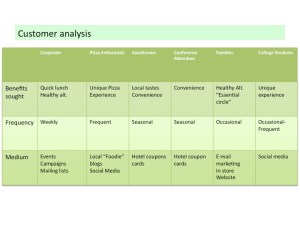
Basically group your customers into groups based on similar interests or lifestyles. It could be the teens, the corporate group, the business owners, the moms, the college group, the young professionals and so forth. By focusing your plan on these four segments you have a clear cross-section of the customers that visit your store.

Customer Analysis-Pizzeria-4Types of Customers Every Business Has


Case in point:

I once did a project for a local pizzeria that had its niche in the local market (it made a very particular kind of pizza). In the customer analysis we broke down who came to their store, or was more likely to stop by, what benefit they got, and how we could speak to them.

Customer analysis step 2: Why do they like you?

This is the benefits sought by your customers. If it’s a store: what do they get? If it’s a website: what time do they visit? How long do they stay? What do they read?

It’s important to know why people buy from you vs. others because these answers help you target the different segments and gives clues to why they should seek you out instead of others. Understanding why they like you is the key to figuring out and catering to their needs.

Next where can you find them?

Customer analysis step 3: How can you market to them?

Speaking to the hearts of your customers involves the right message, on the right platform. Do they follow their favorite brands on Facebook? Do they read certain blogs that you could guest post on? Do they respond well to e-mail campaigns? What kind of causes do they support? Or shows do they watch?

This is super helpful if you want to have a more dynamic social media approach because it helps break down who you are talking to across the various channels instead of an unknown audience. It’s far easier to personalize messages today making it more meaningful and memorable.

This strategy can also be applied to your site. Using the analytics, you can look at how many people visit your site in a day, and where they are coming from. Monitoring your high traffic times helps in planning when to have fresh content available to meet the readers needs, looking at what links lead customers on to your posts helps brainstorm ideas for future articles.

A great strategy is all about picking the right combination to speak to your audience. It doesn’t have to be 4 groups, but try to make it enough do that there are enough sets to spark some marketing ideas, but not too much to feel overwhelming. After all, not everyone is in your audience, so why shouldn’t your marketing strategy have focus?

Contact me if you could use a hand getting started in your own customer analysis plan.

Image credit: Flickr-Scoobay

How to Write E-mails That Sell

By Daisy Quaker

This post is part of a series that will get published every Wednesday on E-mail marketing or social media, subscribe to this blog to receive your copy of how to and helpful small business online marketing guidance.

E-mail Maketing Basics-Small Business Internet MarketingIt will take you more than 5 minutes, but it will last you however long you want the campaign to run, and it will get opened and read. If you’re struggling with crafting e-mail for your small business marketing campaign, the buck stops here.

This is Email Marketing 101, basics to get you started in sending out emails that get read.

1. Pick email software

The simplest way to get started is to start on the right foot. Things to look out for when picking an email software is  the delivarability rate and features. There are a lot of email software services on the web, but three that I am familiar with and have heard great things about are: Aweber,  Constant Contact and Mailchimp.

In a nutshell: Aweber is among the best in the industry, plans start at about $19. ConstantContact is another great e-mail software provider, MailChimp is fun to use, and free for the first 2000 subscribers.

But before you pick read this post that compares the three services, pros, cons so you are better informed. Its important to start with a great software early on because if you have problems down the road switching can be difficult and you could loose all those hard-earned subscriptions.

2. Subject lines make or break you

Just like in writing for web posts, great headlines can entice someone to open your email or not.

Writing great email subject lines is somewhat of an art that you can craft and perfected over time. So pick carefully to communicate a value, emotion, time urgency and a benefit from opening your e-mail.

The goal of  the subject line is to get your e-mail opened and read.  Look out for an upcoming post on writing great email subject lines. In the meanwhile this post talks in detail about how to craft a great subject headline.

3. Give to receive

It’s the power of reciprocation. Great email market campaigns start by giving something of value whether it’s a free e-book, or a discount at your next purchase, you are simply giving the customer something they can use for subscribing to your list. It’s a great way to get people to subscribe to your email campaign.

Once they are subscribed keep track of your sales pitch e-mails. Provide useful content that your subscribers will care about in the first 3-4 email before pitching a service or product to them. After that keep varying with 2-3 useful posts before every sales pitch. It will give you an opportunity to sell your products, but also build a good relationship with your readers where they don’t feel harassed to just buy from your business. That way when you do pitch they are listening.

4. Create a series instead of one offer

Want to keep your readers listening?

Keep it short, and worthwhile of their time and attention. If you are writing great content on say keeping your home clean break it up into bite sized chunks. Say “12 Minutes to a Cleaner Home”, and have tasks that readers can complete weekly to become more organized, so when you do pitch your services say in the 3rd or fourth email they have built a trust that opening your emails deliver some value to their lives. (Read this post on creating a series instead of just one offer)

5. Whats in it for me?

When you do craft your offer communicate a value or benefit that goes beyond price. A really great way to set up your pitch is to offer something that complements all the free advice you’ve given. That way you already have your audiences interest, and they already know what they will benefit from using your product.

Happy emailing!

E-mail marketing is an art that takes time to master,to make our journey easier, perhaps you’d like a free consultation? Contact me and we can set-up a time to discuss your email marketing needs and how to meet your goals.

Don’t forget to subscribe to receive future posts to your inbox.

Image credit: Flickr-SocialMediaOnlineClasses